
TeamCounter guides
Run a drink list with prices, from the first row to the export
Use four neutral example rows to take a small drink list from preparation to an overall total of EUR 4.10. Learn why different drink prices need separate rows and how to correct a counting mistake.
By Maximilian Holstein · Last updated: 19 September 2026
Updated: setup, worked calculation and export guidance.
Prepare one row per person and item price
Create a new drink list and give it a clear period or event name. Choose online when several devices need the same list, or local for this browser. Neutral names in a new local example list are sufficient for this exercise.
TeamCounter calculates quantity × price per entry for each row. Person A needs separate water and juice rows when those prices differ. There is no product catalogue or person-by-item matrix. If you assign rows to a person explicitly, the person overview shows the amount for that person across all of their rows.
Add four rows and count the drinks
- Enter Person A – Water in the person field. Keep the start value at 0, set the price per entry to 0.50, check it and add the person.
- Add Person A – Juice at 1.00, Person B – Water at 0.50 and Person B – Coffee at 0.80 in the same way.
- Use +1 twice for A/Water, once for A/Juice, once for B/Water and twice for B/Coffee.
- Compare each quantity and row total with the table in the next section.
The default price applies to new rows. In the current form, entering a price of 0 falls back to the default price. This example therefore uses positive prices only. There is no central product price list; you can change the price of a single row later with “Edit”.
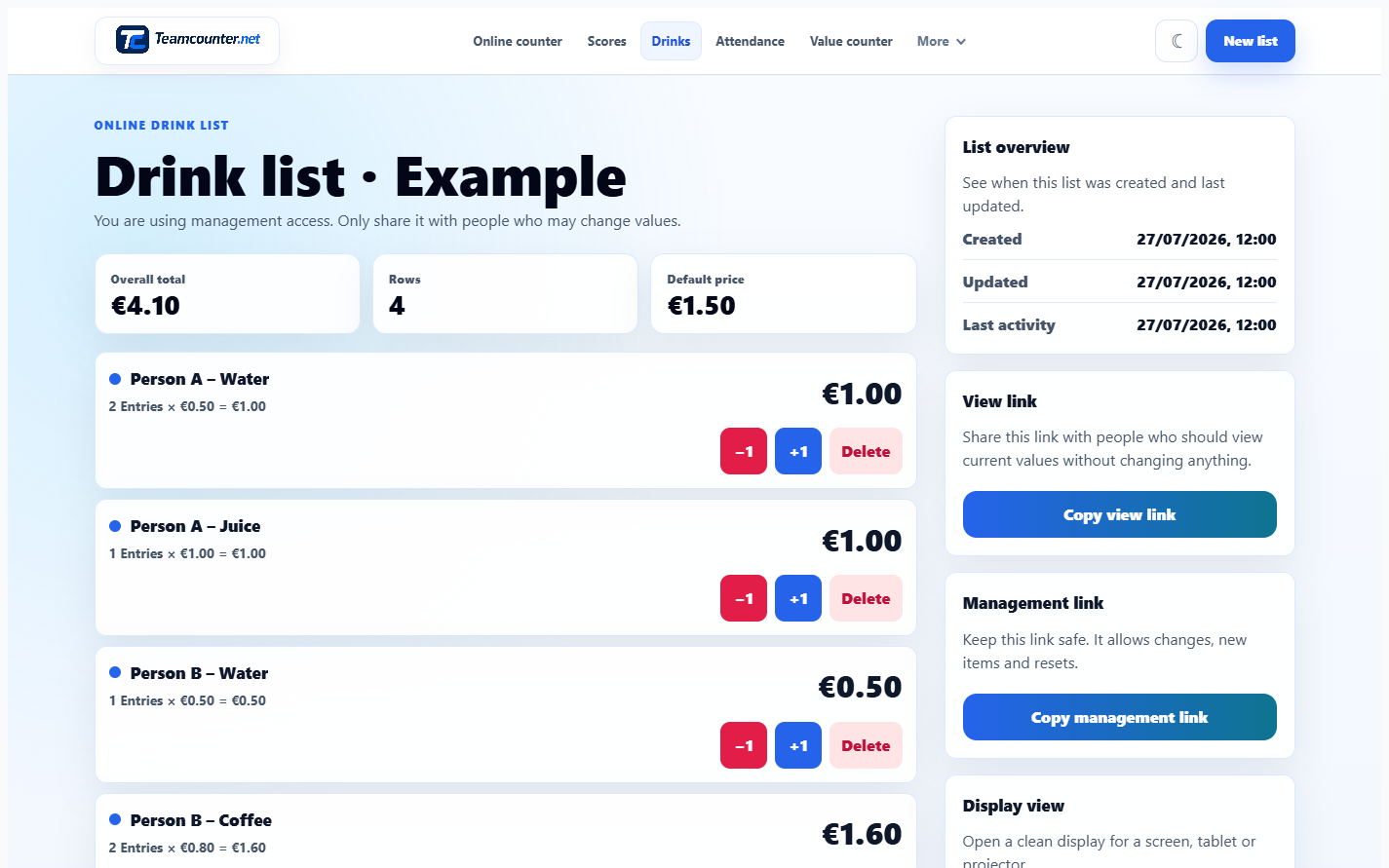
Check the result one row at a time
| Label | Quantity | Price | Total |
|---|---|---|---|
| Person A – Water | 2 | EUR 0.50 | EUR 1.00 |
| Person A – Juice | 1 | EUR 1.00 | EUR 1.00 |
| Person B – Water | 1 | EUR 0.50 | EUR 0.50 |
| Person B – Coffee | 2 | EUR 0.80 | EUR 1.60 |
| Overall total | EUR 4.10 | ||
Person A owes 1.00 + 1.00 = EUR 2.00; Person B owes 0.50 + 1.60 = EUR 2.10. The web tool does not group rows by person on its own. In the person overview, add “Person A” and “Person B” and choose the matching person for each row: the overview then shows an amount of EUR 2.00 for Person A and EUR 2.10 for Person B; rows without a person appear under “Not assigned”. The overall total stays 2.00 + 2.10 = EUR 4.10.
Correct a counting mistake in the affected row
If you accidentally counted A/Water three times, choose −1 once in that row. Check quantity 2, row total EUR 1.00 and overall total EUR 4.10. Deleting removes the whole row; it is not a substitute for a quantity correction.
An incorrect price at creation is a different issue from an incorrect quantity: “Edit” on that row changes its price, name or person and keeps the quantity (for online lists with the management link). Changing the default price later does not automatically correct existing row prices.
Keep the CSV or use a print template
Choose “Export CSV” and open the downloaded file to check it. On English tool pages the exporter writes the columns Person / item, Count, Price, Row total and an Overall total row. The website-exporter CSV with synthetic data contains the four example rows; its final value is 4.1, meaning EUR 4.10. Once rows are assigned to people, the file also contains a block with Person, Rows, Entries, Amount. German tool pages export the same values with German headings.
The templates page also provides a completed English CSV template and a blank print form. Use the export guide to check columns, number formats and the browser PDF output. CSV files are snapshots and do not automatically synchronise with the list.
Agree how to share it and understand its limits
For online lists, share the management link only with people who may count and correct entries. A view link is sufficient for checking; it also shows the person overview, which only the management link can change. The Android app does not show person assignments, and rows added there appear on the website as not assigned. Agree who records each drink so two people do not count the same event.
At the end, review quantities, prices, period and totals together. TeamCounter does not issue invoices or replace a cash register, stock-management or accounting system. Keep bank details and confidential payment information out of the list. The software decision guide helps assess whether a fuller system is needed.